
License management for ServiceNow
A best practices guide
About this guide
ServiceNow is a strategic vendor for enterprise organizations—but it’s also one of the most active auditors in the SaaS space. In fact, over 20% of surveyed companies have faced a ServiceNow audit in the past three years, according to the 2025 Flexera State of ITAM Report. With ServiceNow’s fiscal year ending in December, many organizations are preparing for renewals—and facing tough questions about license compliance, especially with emerging AI and consumption-based add-ons (e.g., Now Assist) that are often billed separately.
This guide provides best practices for managing ServiceNow licenses effectively. Proper license management is critical for avoiding audit risks, controlling costs and ensuring compliance. Preparing now—through clean entitlement data, role hygiene, reconciliation across tools and governance for AI usage—reduces exposure and cost surprises.
SaaS vs. on-premises audit considerations
| On‑premises software audits | SaaS audits |
|---|---|
| Typically focus on installed software, physical servers and device counts | Focus on actual usage, assigned roles and consumption metrics (e.g., API calls, AI assists) |
| Auditors may request inventory scans, deployment logs and physical access to environments | Audits are performed remotely, leveraging in‑product data and compliance reports |
| License compliance is often based on perpetual entitlements, with true‑ups for over‑deployment | License compliance is tied to subscription terms, with periodic checks and renewal cycles |
| Audit findings may result in retroactive fees for unauthorized installations or usage | Limiting usage or upgrading resolves overuse; penalties are rare, but suspension or termination may occur |
Why audit preparation = renewal readiness
Preparing for a ServiceNow audit is not just about risk mitigation—it’s a strategic exercise that sets you up for your next renewal. The primary principle of any audit is to ensure you’re only paying for what you actually need—nothing more, nothing less. Organizations estimate 21–25% waste in their SaaS environment.
Organizations estimate 21–25% waste in their SaaS environment.
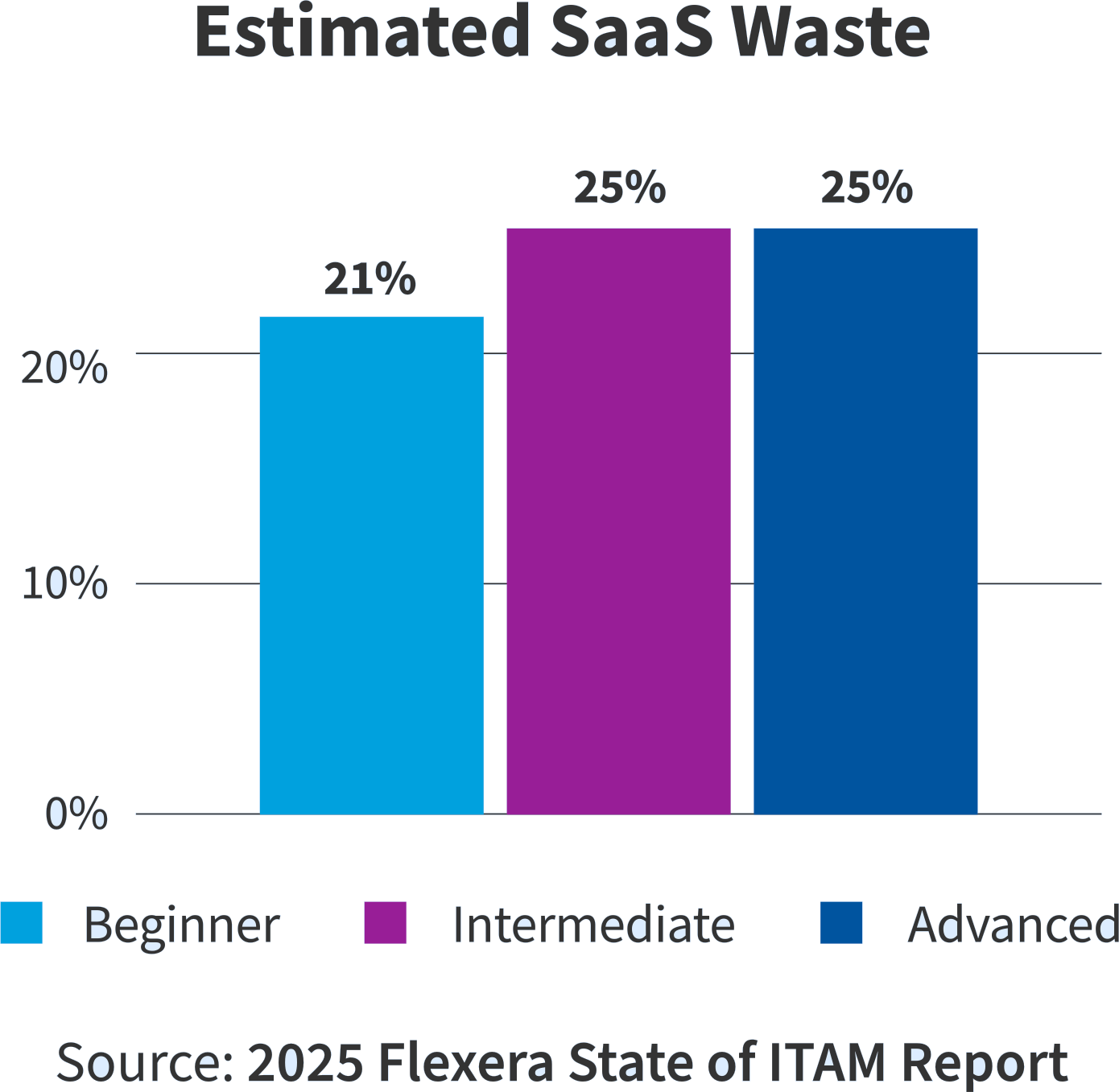
Table of contents
Understanding ServiceNow licensing
ServiceNow offers various licensing structures including user-based, role-based, application-based and consumption-based models. Licensing metrics and compliance triggers must be understood to manage entitlements effectively. This table outlines common license metrics and what to watch out for.
User license
Description
Based on named users’ assigned roles
Management considerations
Track actual usage vs. assigned roles; avoid over-allocation Risks: Overlapping subscriptions, unused roles
Risks
Overlapping subscriptions, unused roles
Role-based license
Description
Tied to packaged app entitlements and specific roles within ServiceNow
Management considerations
Validate role assignments; monitor direct vs. group-based roles
Risks
Blind spots in Subscription Management V2
Application license
Description
Licensed per ServiceNow application (e.g., ITSM, CSM)
Management considerations
Monitor application usage; reconcile against purchases
Risks
Misalignment between usage and entitlements
Consumption license
Description
Based on volume of Integration Hub, API calls and storage consumption
Management considerations
Track Integration Hub usage and storage consumption
Risks
Hidden charges and audit exposure
Custom applications
Description
Internally developed apps within ServiceNow
Management considerations
Identify unused apps; reduce technical debt
Risks
Compliance gaps and cost inefficiencies
AI-driven licensing / Now Assist
Description
Emerging model for AI agents, assistants, GenAI workflows, transactional pricing and consumption-based models
Management considerations
Understand pricing tiers and usage thresholds and which SKUs contain Now Assist features
Risks
Unclear audit criteria and evolving policies
Packaged/Pro licensing
Description
Pro, Enterprise and Pro+ packages bundle features but may still require add-ons
Management considerations
Confirm what products and add-ons have been purchased
Risks
Unclear audit criteria and evolving policies
Recent changes to ServiceNow licensing and management
With the latest AI innovations, there have been several licensing changes for customers to be aware of. These include licensing for AI features, understanding Now Assist on workflow costs (in addition to Integration Hub transaction costs) and the new Subscription Management tool.
Licensing based on AI and consumption
ServiceNow’s AI/assistant features (e.g., Now Assist) are separately licensed and often consumption-based (“assists” per use). Usage varies by task—incident summaries use fewer assists than app creation. Expect new billing items and audits, so coordinate with your account team to forecast costs and avoid overages.
Verify Subscription Management data
Subscription Management v2 is the in-product system of record but may miss details. Flexera customers report mismatches with Use Verification Reports and group allocations. Reconcile data—don’t rely solely on in-product figures for audits.
Integration Hub costs with Now Assist
Flows using Integration Hub and Now Assist may raise costs. Review logic to spot triggers and optimize by merging actions or removing real-time updates.
Tools and data sources for license optimization
There are a few tools you can use to manage your ServiceNow environment. Here’s an overview of the data available in each tool and how it’ll help you optimize your environment.
Data and reports to assess your compliance position:
User activity reports
Determine if you’re using less than what is allocated—reclaim licenses, predict needs based on historical usage and don’t over-buy.
Where to get them:
- Flexera One SaaS Management
- Use Verification Reports (provided by ServiceNow Account Manager)
Summary of SKUs purchased
Enables you to track down which products you are entitled to; with a normalization and enrichment offering (like Flexera), you’ll also be able to assess upgrade, downgrade and other product use rights
Where to get it:
- Add to Flexera One SaaS Management
- ServiceNow Contract
License allocations and compliance reports
Help you identify if you’re out of compliance and if you have overbought licenses
Where to get them:
- Flexera One SaaS Management
- ServiceNow Subscription Management Application
Custom application engagement reports
Help you reduce technical debt by understanding if custom apps are being used
Where to get them:
- Flexera One SaaS Management
Application usage data and optimization recommendations
Cross-product usage and optimization recommendations for Approver, Fulfiller and Business Stakeholder license types
Where to get them:
- Flexera One SaaS Management
Now Assist usage
Now Assist usage data help you view the number of assists consumed by each instance
Where to get it:
- Now Assist Dashboards
Integration Hub transactions
Integration Hub metrics help you track and manage your license use for the ServiceNow Integration Hub; they also help you find which parts and actions are using the most transactions
Where to get them:
- Integration Hub transaction logs
Comparison of ServiceNow license management data requirements and tooling
Use this chart to identify gaps in tooling for ServiceNow license optimization.
| User activity views/reports | License allocations and compliance views/reports | License allocation and optimization recommendations | Now Assist usage | Integration Hub usage | Out-of-the-box and custom application engagemente | |
|---|---|---|---|---|---|---|
| Flexera | ✓ | ✓ | ✓ | × | × | ✓ |
| ServiceNow Subscription Management Application | × | ✓ | × | × | × | × |
| ServiceNow Use Verification reports | Request from account manager | × | × | × | × | × |
| Now Assist dashboards | × | × | × | ✓ | × | × |
| Integration Hub logs | × | × | × | × | ✓ | × |
Audit preparation and risk mitigation
Common audit triggers include monthly or quarterly account reviews and fiscal year-end reviews. Organizations should implement data reconciliation strategies, leverage third-party verification and use external benchmarks to mitigate audit risks. It’s also important to have a baseline understanding of what’s included in your contract and expectations of consumption limits.
Did you know?
Flexera One SaaS Management’s analytics engine provides usage details for all subscriptions and automatically highlights opportunities to apply the most cost-effective licenses, ensuring compliance.
Common pitfalls
- Relying solely on Subscription Management numbers—always reconcile to Use Verification and raw logs
- Ignoring Integration Hub cost interplay—verify whether AI flows also consume transactions to understand the overall license costs for workflows so that you can advise on optimization activities
- No AI governance—uncontrolled experimentation can cause large, unexpected consumption bills and audit questions, so put governance in place before a broad rollout
Clarifying questions
- How is Now Assist licensed for our organization? Are there volume/cap limits or tiers?
- Can you provide some examples of sample assist counts for organizations of our similar size for common flows?
- What’s your recommendation to identify overlapping users (those who have access to the same application in multiple subscriptions)?
Practical Audit Readiness Checklist
- Inventory and map entitlements
Export Subscription Management v2 data and the Use Verification/Compliance report. Compare subscriptions, roles, groups and actual named users. - Role and group hygiene (quarterly)
Remove unused roles, enforce least privilege, track group-based assignments that may increase subscribed counts. - Measure consumption sources
Stitch together Integration Hub transaction logs, API metrics, storage and Now Assist counts. Identify spikes and root causes. - Enable and retain audit records
Ensure you keep records of compliance. ServiceNow reserves the right to remotely audit your subscription usage and may request reasonable assistance to verify compliance. Typical contract language (customers may negotiate different terms) states that if usage exceeds purchased capacity by 5% or more, you must correct it within 30 days by reducing usage or purchasing additional licenses; failure to comply may result in suspension or termination of services. - Reconcile multi-instance usage
If you have dev/test/prod or multiple instances, enable Subscription Management data sharing and reconcile subscribers by domain. - Prepare your effective license position
Report on roles, group membership, subscription mapping, usage logs and assist consumption by use case. Do this before all renewal windows. - AI governance
Define approved use cases for Now Assist, instrument assists per use case and set caps/alerts on consumption to avoid surprise bills. - Engage procurement and legal early
Get contract clarification on Now Assist inclusions/exclusions and Integration Hub interactions. Negotiate caps or blended pricing where predictable. - Run a mock audit
Use internal audit or a third party to request typical audit deliverables and measure time to respond and gaps.
What to do if you’re facing an audit
If you’ve received an audit notice letter, don’t panic. Move forward with confidence and start your audit journey by checking out our guide—10 steps to navigating a software audit.
We also recommend you register for Flexera’s Vendor Audits Readiness Workshop. In these sessions, up to three members of your team will participate in a hands-on workshop with former audit defense practitioners on Flexera’s Solutions Advisory team. These experts will equip you with audit preparation best practices, advice on your rights and obligations during a vendor audit, clarity on the data you’ll need to meet audit demands—and much more.